The report is sent. The job isn’t finished.
Know what’s still unfixed.
A photo records a moment. A permanent snag reference lets you show what changed on your return visit. Here is an illustrative record, not a customer case study.
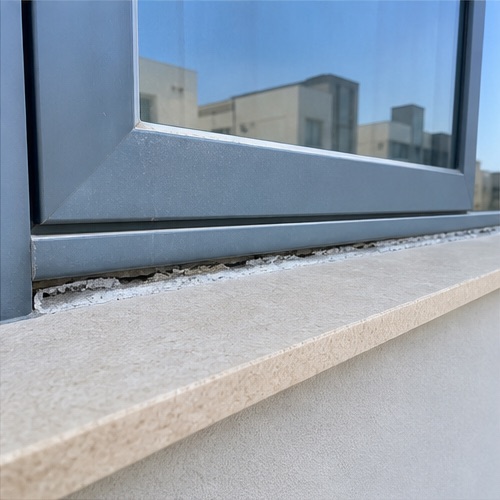
DEMO-001 · Living room window
A gap in the seal
Observation: A visible gap remains along the lower window edge.
Requested action: Inspect the gap and confirm how it will be made good.
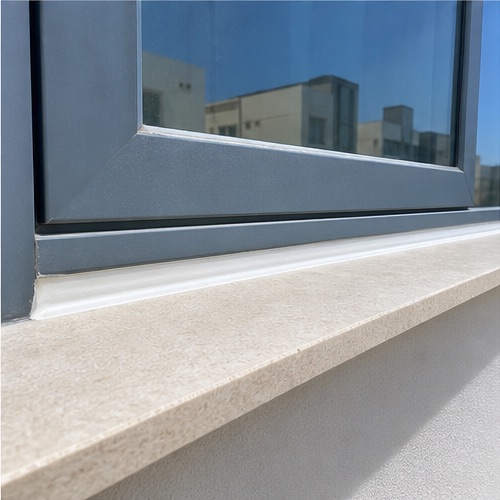
DEMO-001 · Same snag reference
The outcome, with evidence
Recorded outcome: Fixed, with a completion photograph attached.
The original evidence stays with the record. The inspector records the outcome; the software does not certify the repair.
And if it hasn’t been fixed?
Record Still defective. If you cannot check it, use Unable to inspect or Not attempted. Issuing a close-out report does not mean every snag is closed.
Try up to three snags with your own photos and notes, without an account or card. The preview does not perform reinspection; the comparison above illustrates that later step.
See the document before you buy.
A useful report lets someone find the defect, understand the requested action and return to the same item after a repair. Open our sample to see how that information stays together.
Download the sample PDFThis is a demonstration report, not a customer testimonial, professional certification or a guarantee that a builder will carry out repairs.
One reference. The information needed to act.
- Permanent reference
- Keep the same identifier in the initial report and later revisions, so replies refer to the same defect.
- Location and evidence
- Name the room and exact position. Attach photographs that show the context as well as the detail.
- Observation
- Describe what you saw: “A visible gap remains in the sealant along the lower window edge.” Do not guess the cause.
- Requested action
- State the next step: “Please inspect the gap and confirm how it will be made good.” Technical remedies need appropriate judgement.
- Trade and target date
- Record the responsible trade and agreed date where known. Distinguish proposed dates from agreed ones.
- Outcome
- Keep unresolved items visible. Close an item only after the required inspection and completion evidence.
Follow the same issue through three stages.
- Capture: record the location, original photograph and observation while the issue is in front of you.
- Review and issue: check the category, wording and requested action. Issue the initial report and send the PDF.
- Reinspect: return to the original reference. Record Fixed, Still defective, Unable to inspect or Not attempted. Fixed items require a completion photograph.
Try adding one fictional snag in the interactive demo. It updates the live report preview without signing up. Demo changes are temporary; the downloadable sample PDF is a separate example.
Know the limits of a home checklist
This guide helps you record visible conditions. It is not a structural survey, safety certificate or legal assessment, and does not set warranty deadlines or determine liability. Follow your own contract and local professional advice. Do not open electrical equipment, climb to unsafe areas or test anything you are unsure about.
For background, see RICS’s explanation of snagging. Its UK context does not establish local rights or requirements.
See your own notes become a snag report.
Add up to three snags with your own photos and observations. No account or card required. The preview stays in your browser; saving a cloud project and issuing the full PDF require a plan.
Create your own report previewNeed room-by-room guidance? Or explore snagging report software for inspectors.
Paid access includes one property’s notes, photos, initial report and later close-out revisions. €15 once per property. Compare plans.