When to use a new-build snagging checklist
A snag list is a record of visible problems or unfinished work that you want to raise with your builder. You can use this checklist to prepare for an agreed pre-handover visit or to organise issues you notice after moving into your new house or flat.
Ask the developer when access is available, which areas you may inspect and how they want you to report issues. Check your own contract, warranty and reporting arrangements for applicable deadlines. This checklist does not set or extend those deadlines, and a completed checklist is not confirmation that a property is safe or defect-free.
You can read and print this guide without an account. If you want the prompts, photographs and follow-up record together, see SnagAction’s guided snagging app for homebuyers.
Before the visit: give yourself a simple route
Bring a charged phone, the agreed specification or drawings you have, and a list of rooms and areas included in the property. Arrange enough time and safe access with the builder.
Start at the entrance, move around each room in the same direction and finish with external areas you can access safely. If a room is locked, furniture hides a surface or an item cannot be operated, record that limitation. An unchecked area is not the same as an area with no issues.
For an assessment of construction quality, hidden defects or safety, arrange an appropriately qualified professional. A homeowner’s visual list has a different scope.
Room-by-room visual checklist
Want the prompts inside your inspection? Try the free guided room-check demo with sample data. It does not save real work. Paid property projects save your answers, link problems to photos and include unchecked items in your report.
The free boxes below are a temporary reminder and do not save progress. You can also print this page. Repeat relevant checks for each room, and keep a separate note of anything you could not check.
For a flat, agree which balcony, parking, storage and shared areas are included in your visit. Record the exact location of a shared-area issue and ask the developer or building manager who should receive it. Do not assume that access to your flat includes access to every part of the building.
Record each issue so someone else can find it
Use one item per problem. Include the room, a precise position, the date, a wide photograph, a close-up and a factual note. Keep unrelated issues separate even if they are in the same room.
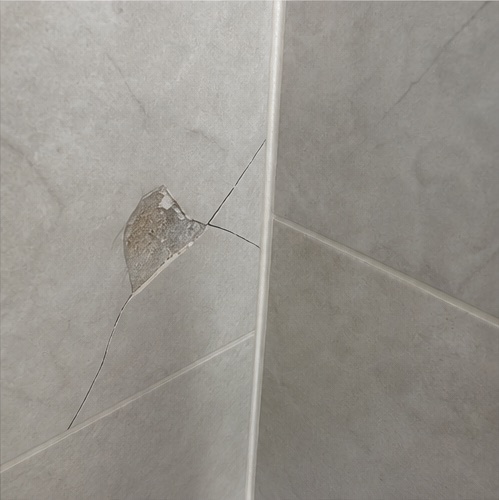
Bathroom · beside the shower · Item 01“One wall tile has a visible crack at its lower corner. Please inspect the affected tile and confirm the repair to be carried out.”
That is more useful than “bathroom is bad” and avoids diagnosing something you cannot verify. If you do not know the technical remedy, ask the builder to confirm it. See the guide to sending your defect list for an example message.
After the visit: send, agree, then check
- Review the photographs and notes while the visit is fresh in your mind.
- Send a dated report through the agreed channel. Keep a copy and request acknowledgement.
- Ask which items the builder agrees to address and what dates they propose. Keep disputed items clearly identified.
- Return to each original reference after the repair. Add the outcome and a new photograph rather than replacing the original.
Completing the capture stage and verifying repairs are different steps. Do not mark the whole property finished simply because you have walked through every room. Use our repair-checking guide for the follow-up visit.
Common new-build snagging questions
Can I make my own snag list?
You can record visible issues and unfinished work yourself. Describe what you can see rather than diagnosing a cause or declaring that work breaches a standard. If you are uncertain, record the limitation and ask a qualified professional. Do not attempt specialist or unsafe tests.
Do I still need a professional inspection?
This checklist cannot assess structural performance, hidden defects, electrical or gas safety, or compliance with building requirements. A qualified inspector or relevant specialist can advise on a different scope of work. SnagAction provides guidance and record-keeping software, not an inspection service.
Is a free checklist enough?
It may be enough to organise a simple visual visit if you keep your own photos and notes separately. An app can help when you want each issue, its evidence and later repair outcome in one record. See the example snag report before deciding what you need.
Where can I find further homeowner guidance?
NHBC publishes homeowner guidance and a new-home checklist. Check your own developer and warranty provider’s information too. This is an independent SnagAction guide; it is not an NHBC checklist, approval or endorsement.
Know the limits of a home checklist
This guide helps you record visible conditions. It is not a structural survey, safety certificate or legal assessment, and does not set warranty deadlines or determine liability. Follow your own contract and local professional advice. Do not open electrical equipment, climb to unsafe areas or test anything you are unsure about.
For background, see RICS’s explanation of snagging. Its UK context does not establish local rights or requirements.
See your own notes become a snag report.
Add up to three snags with your own photos and observations. No account or card required. The preview stays in your browser; saving a cloud project and issuing the full PDF require a plan.
Create your own report previewNeed room-by-room guidance? Or explore snagging report software for inspectors.
Paid access includes one property’s notes, photos, initial report and later close-out revisions. €15 once per property. Compare plans.